Starter packs
Highlight Badges Starter Packs provide predefined sets of badge configurations, enabling users to quickly deploy collections of Highlight Badges in their Salesforce environments.
Highlight Badges Starter Packs allow an admin to more easily move app configuration from a sandbox org to a production org, or to share collections of badge definitions with other orgs.
Import the Quick Start pack
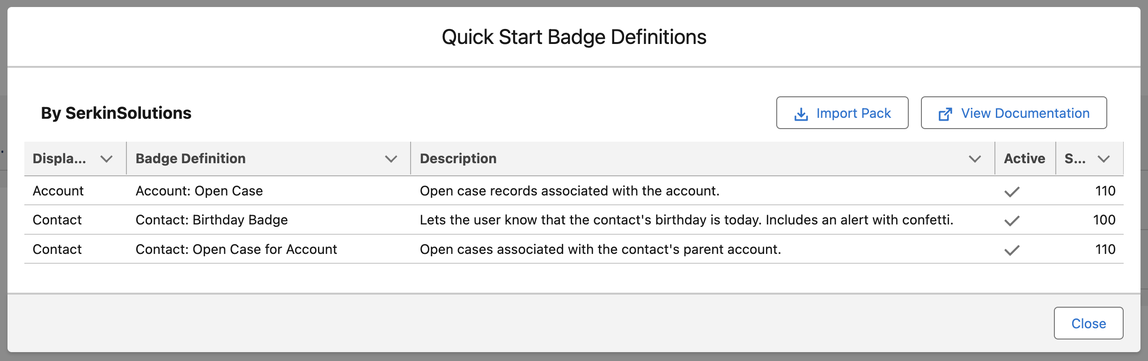
A small collection of sample badge definitions is included when installing Highlight Badges. You can import these to use them as templates when getting started. In the Highlight Badges Setup app, navigate to the Highlight Badges Starter Packs tab.
In the Available Starter Packs menu, click the dropdown menu next to Quick Start and select Preview. Then select Import Pack and OK.
Create your own starter pack
You can also bundle your own Highlight Badge Definitions into starter packs. From the Highlight Badges Starter Packs tab, click New Starter Pack.
- Give the starter pack a name and enter the author (this could be your name, a department name, or the organization name).
- Optionally, select an icon to associate with this collection and provide a link to any help or setup documentation.
- Lastly, select the Highlight Badge Definition records to include in the starter pack.
- Click Convert to Metadata.
This will create custom metadata records for each of the selected definitions. These records can now be deployed, along with any related metadata like custom fields and flows, with your preferred metadata deployment tool. Include your:
- Highlight Badges Starter Pack (custom metadata)
- All Badge Definition Templates (custom metadata)
- All Badge Action Templates (custom metadata)
Published starter packs
- Traction Rec Starter Pack: badges for common Traction Rec use cases.