Architecture
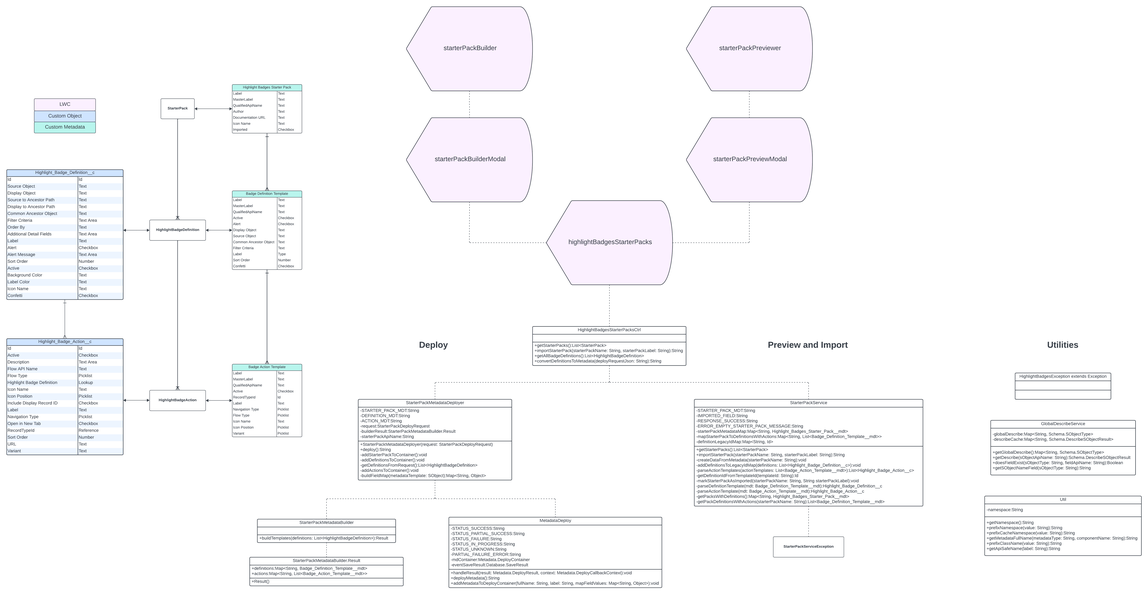
How the Highlight Badges package fits together. The package has three parts: the record page display that users see, the configuration experience that admins use to build badge definitions, and starter packs for moving configuration between orgs. Each part is described below with its diagram. For a catalog of every component, see the Component glossary.
Click any diagram to open it at full size.
Entity relationship diagram
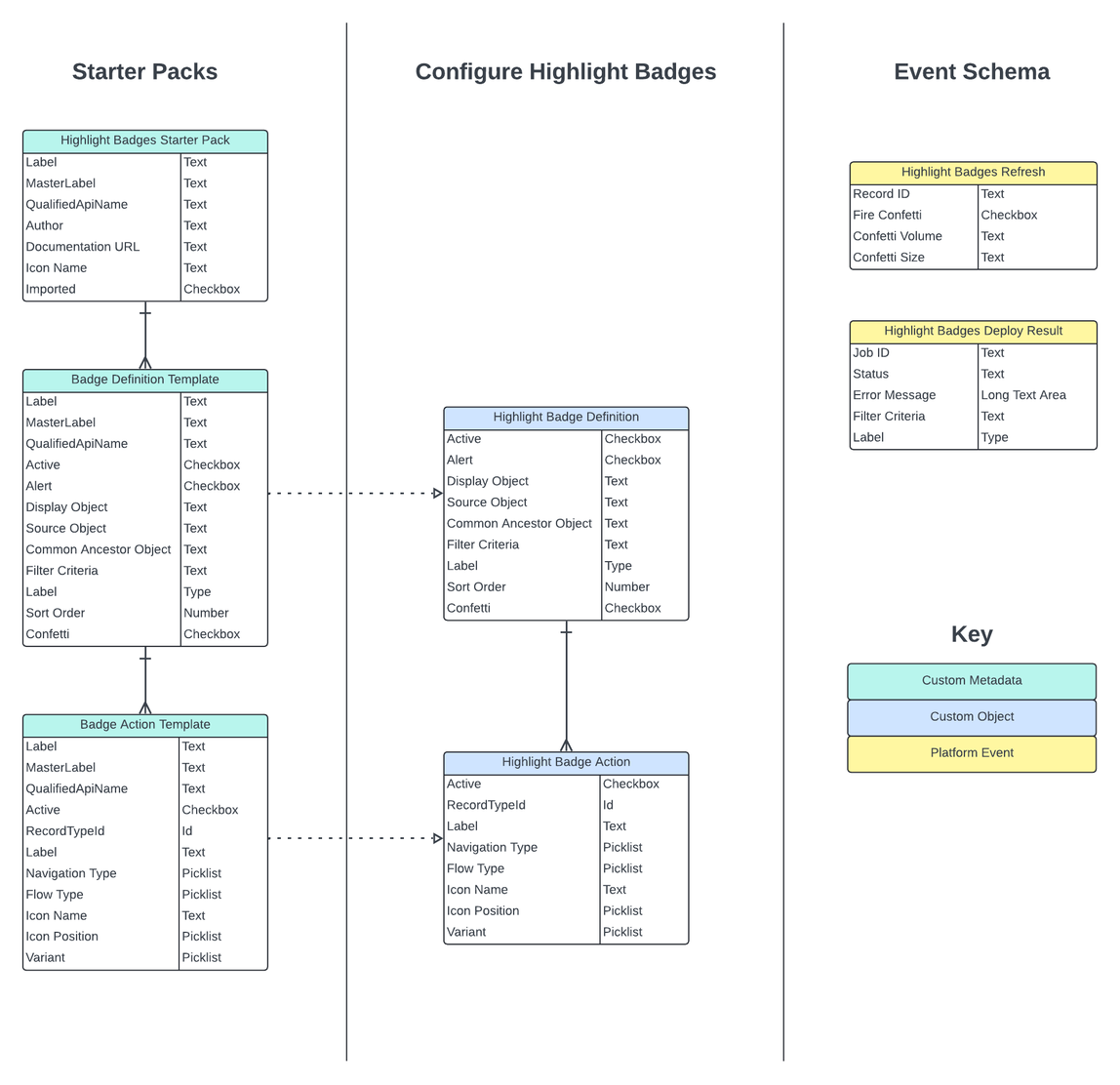
Badges are configured as Highlight Badge Definition records, with related actions as child Highlight Badge Action records. Three custom metadata types mirror these objects so that configuration can be packaged and deployed: a Highlight Badges Starter Pack parents a set of Badge Definition Templates, each of which parents its Badge Action Templates. Two platform events round out the data model: Highlight Badges Refresh tells display components to reload, and Highlight Badges Deploy Result reports the outcome of a starter pack deployment.
Every field on these objects is listed in the table of components.
Record page display
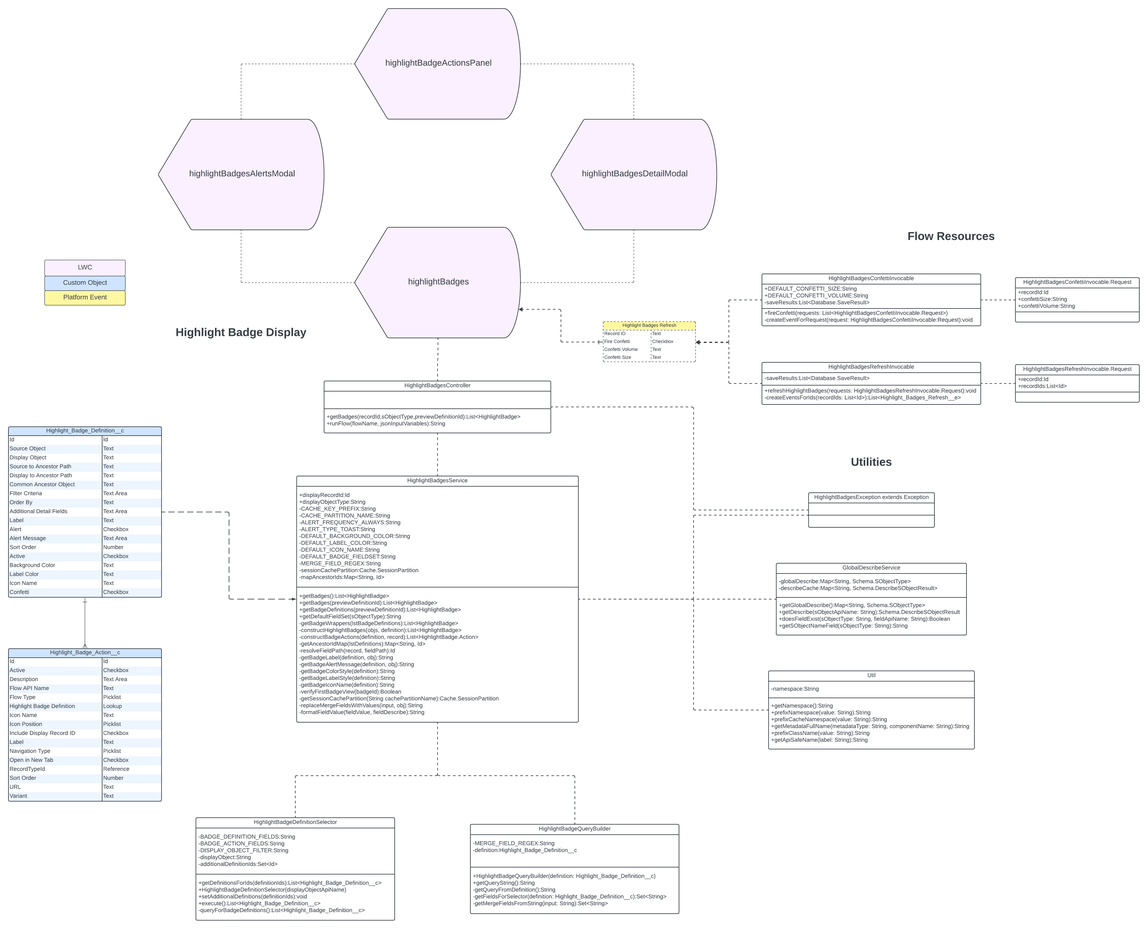
The highlightBadges Lightning web component is available for standard and custom object record pages, as well as app pages, Flow screens and Experience Cloud pages. It is a parent component that displays a collection of badges. It has two child modal components: highlightBadgesDetailModal uses Lightning Record View Form to display details from a related record, and highlightBadgesAlertsModal displays the alerts configured for active badges. Both modals include the highlightBadgeActionsPanel component, which displays a collection of buttons for the navigation and flow actions related to a badge.
These components are supported by the HighlightBadgesController Apex class, which provides two methods: one to get the collection of active badges for a particular record, and one to run an autolaunched flow action selected in the actions panel. Both check the Can View Highlight Badges custom permission on the server: getBadges() returns no badges and runFlow() refuses without it. The getBadges() method creates an instance of HighlightBadgesService, which holds the business logic for badge retrieval and construction. The service uses HighlightBadgeQueryBuilder to create a SOQL query for each highlight badge definition relevant to the current record, reads the definitions through HighlightBadgeDefinitionSelector, and runs the queries for definitions in System Mode through HighlightBadgeRecordQuery. Those two are the package's only classes declared without sharing. (The diagram below predates HighlightBadgeRecordQuery.)
User security is enforced throughout the application. By default a badge query runs in user mode, so a badge appears only when the running user can read its source object, the fields in its filter criteria and order by, the fields on both relationship paths, and any merge fields in its label or alert message. The relationship path from the display record to the common ancestor is checked against the user's field access before it is queried, so one unreadable path hides only the badges that use it. A definition in System Mode is the exception: an admin holding Can Enable System Mode opts it in, and its query and ancestor lookup run in system mode without sharing from HighlightBadgeRecordQuery. Each badge from such a definition carries a flag saying whether the user can read its source record (from UserRecordAccess); when they cannot, the service drops the badge's Source Record action and the modal shows a notice instead of the record. Source Detail Fields are never queried: the details modal reads them through Lightning Data Service and shows the ones the user can read. See User security for the permission sets included in the package and System mode for the opt-in.
Badge definition configuration
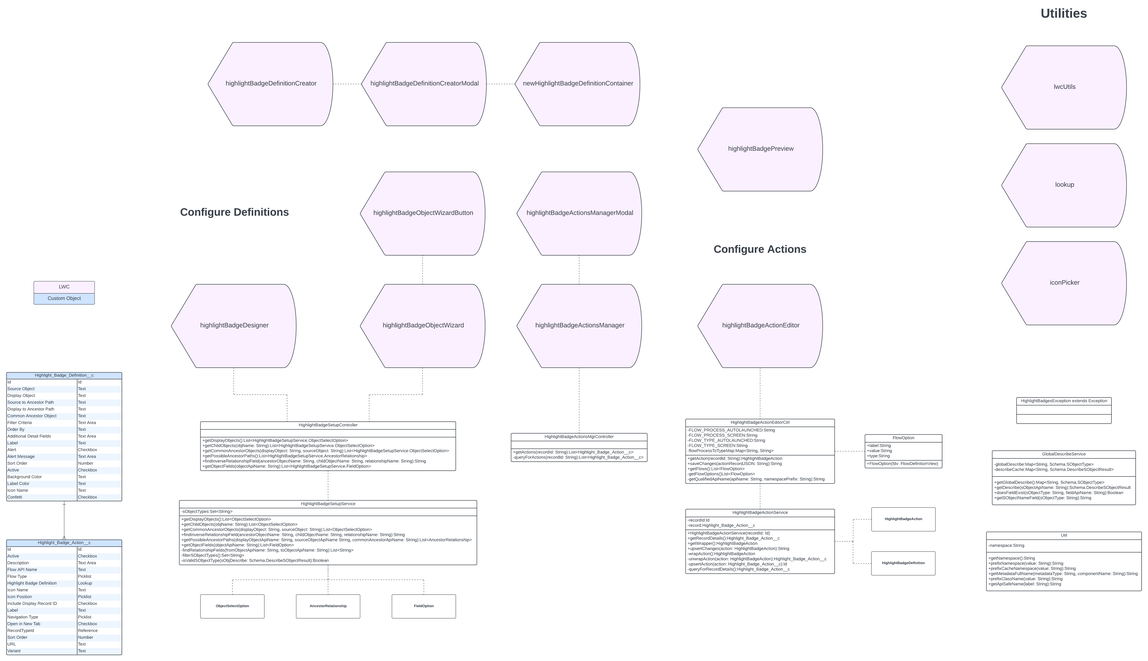
The vast majority of package components support the admin's configuration experience. A set of small wizards help with setting up highlight badge definitions and their actions.
The Highlight Badge Definition object overrides the standard New action. An Aura component wraps a Lightning web component that opens a modal to capture the basic details of the record. The packaged Lightning record page includes Dynamic Forms components for most record details, a component for guided setup of object relationships (highlightBadgeObjectWizard), and a component for guided design of the badge and its details (highlightBadgeDesigner). These are supported by the HighlightBadgeSetupController and HighlightBadgeSetupService Apex classes. The setup service uses GlobalDescribeService to cache schema describe results and to look up default settings for certain sObject types.
A preview component (highlightBadgePreview) shows what the badge will look like on a sample record page. It uses a polymorphic lookup component so that a record of the definition's display object type can be selected. See Preview badges.
The highlightBadgeActionsManager component lets the admin configure related Highlight Badge Actions from a Highlight Badge Definition record page. Its Edit action opens highlightBadgeActionEditor, which offers guided inputs that standard detail components do not: a picklist of active autolaunched and screen flows, and a lookup of supported icon names for Lightning buttons. See Badge actions.
Starter packs
The final part of the package distributes highlight badge configuration. The Highlight Badges Starter Packs app page hosts the highlightBadgesStarterPacks component, which converts Highlight Badge Definition records to custom metadata so that they can be packaged and deployed. This lets an admin move configuration from a sandbox to production, or share collections of badge definitions with other orgs. See Starter packs for the procedure.
For Highlight Badge Definitions, there is the Badge Definition Template custom metadata type. For Highlight Badge Actions, there is the Badge Action Template custom metadata type. A collection of Badge Definition Templates is parented by a Highlight Badges Starter Pack custom metadata record so that it can be deployed as a unit.
The starterPackBuilder component collects details about what to include in a starter pack and provides the Convert to Metadata action. The starterPackPreviewer component shows the contents of a starter pack and lets the user import them as Highlight Badge Definition records, if not already imported. These components are supported by the HighlightBadgesStarterPacksCtrl Apex class, whose methods mostly pass requests along to StarterPackService, which holds the business logic. A set of classes organize and manage deployments through the Metadata API: MetadataDeploy, StarterPackMetadataBuilder and StarterPackMetadataDeployer.